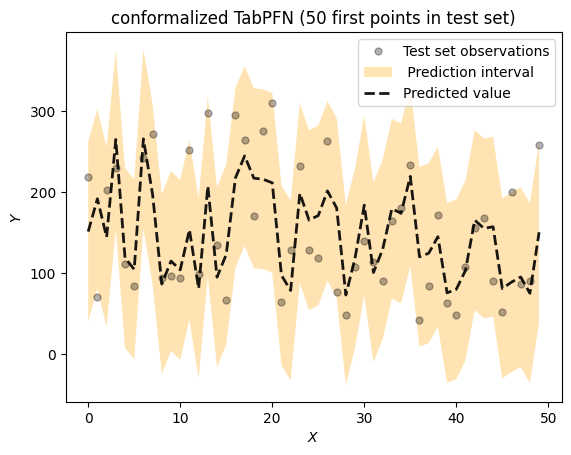
Connaître la prédiction d’un modèle est utile. Sachant à quel point cette prédiction est fiable, cela l’est encore plus. La prédiction conforme fournit exactement cela : des intervalles de prédiction statistiquement valides avec une couverture garantie (sous certaines conditions), quel que soit le modèle sous-jacent ou la distribution des données.
Dans cet article, nous associons deux outils puissants : TabPFNun transformateur pré-entraîné pour les données tabulaireset nnetsaucec’est PredictionInterval (qui implémente Split Conformal Prediction), qui enveloppe tout régresseur compatible scikit-learn dans un prédicteur conforme. Nous démontrons le pipeline complet sur l’ensemble de données sur le diabète, d’abord en Python, puis en R via reticulate. Les deux versions produisent des résultats identiques : un taux de couverture de 96,7 % au niveau nominal de 95 %.
!pip install tabpfn tabpfn_client

!pip install nnetsauce

import tabpfn_client

API_TOKEN = "" # <- Paste your TabPFN token here (from


tabpfn_client.set_access_token(API_TOKEN)

from sklearn.datasets import load_diabetes
from sklearn.model_selection import train_test_split
from tabpfn_client import TabPFNRegressor
from sklearn.metrics import mean_squared_error
import numpy as np

reg = TabPFNRegressor()

X, y = load_diabetes(return_X_y=True)
X_train, X_test, y_train, y_test = train_test_split(X, y, test_size=0.2, random_state=42)

reg.fit(X_train, y_train)
preds = reg.predict(X_test)
rmse = np.sqrt(mean_squared_error(y_test, preds))
print(-rmse)

00:00 Fitting... |

WARNING:tabpfn_client.client:The provided train set hashes match previously uploaded train sets.


00:00 Fitting... Done!
00:00 Predicting... -

WARNING:tabpfn_client.client:The provided test set hash matches a previously uploaded test set.


00:01 Predicting... Done!
-51.559912022529886

import nnetsauce as ns

reg_conformal = ns.PredictionInterval(reg, level=95)
reg_conformal.fit(X_train, y_train)
preds = reg_conformal.predict(X_test, return_pi=True)

00:00 Fitting... |

WARNING:tabpfn_client.client:The provided train set hashes match previously uploaded train sets.


00:00 Fitting... Done!
00:00 Predicting... -

WARNING:tabpfn_client.client:The provided test set hash matches a previously uploaded test set.


00:01 Predicting... Done!
00:00 Predicting... -

WARNING:tabpfn_client.client:The provided test set hash matches a previously uploaded test set.


00:01 Predicting... Done!
00:00 Predicting... -

WARNING:tabpfn_client.client:The provided test set hash matches a previously uploaded test set.


00:01 Predicting... Done!

print(f"coverage_rate: {np.mean((preds.lower<=y_test)*(preds.upper>=y_test))}")

coverage_rate: 0.9662921348314607

import warnings
import matplotlib.pyplot as plt


warnings.filterwarnings('ignore')

split_color="green"
split_color2 = 'orange'
local_color="gray"

def plot_func(x,
              y,
              y_u=None,
              y_l=None,
              pred=None,
              shade_color="",
              method_name="",
              title=""):

    fig = plt.figure()

    plt.plot(x, y, 'k.', alpha=.3, markersize=10,
             fillstyle="full", label=u'Test set observations')

    if (y_u is not None) and (y_l is not None):
        plt.fill(np.concatenate([x, x[::-1]]),
                 np.concatenate([y_u, y_l[::-1]]),
                 alpha=.3, fc=shade_color, ec="None",
                 label = method_name + ' Prediction interval')

    if pred is not None:
        plt.plot(x, pred, 'k--', lw=2, alpha=0.9,
                 label=u'Predicted value')

    #plt.ylim([-2.5, 7])
    plt.xlabel('$X$')
    plt.ylabel('$Y$')
    plt.legend(loc="upper right")
    plt.title(title)

    plt.show()


max_idx = 50
plot_func(x = range(max_idx),
          y = y_test[0:max_idx],
          y_u = preds.upper[0:max_idx],
          y_l = preds.lower[0:max_idx],
          pred = preds.mean[0:max_idx],
          shade_color=split_color2,
          title = f"conformalized TabPFN ({max_idx} first points in test set)")

Pour cette version R, j’ai utilisé R dans le même notebook que Python, dans Google Colab.
%load_ext rpy2.ipython

%R install.packages("reticulate")

%%R

# Conformalized TabPFN in R via reticulate

library(reticulate)

# ── 0. Python environment ──────────────────────────────────────────────────────
# Use your preferred Python env. Uncomment one (automatic on Google Colab):
# use_python("/usr/bin/python3")
# use_virtualenv("r-tabpfn")
# use_condaenv("r-tabpfn")

# Install required packages into the active Python env (run once)
# py_install(c("tabpfn", "tabpfn_client", "nnetsauce", "scikit-learn",
#              "matplotlib", "numpy"), pip = TRUE)

# ── 1. Imports ─────────────────────────────────────────────────────────────────
sklearn_datasets  <- import("sklearn.datasets")
sklearn_model_sel <- import("sklearn.model_selection")
sklearn_metrics   <- import("sklearn.metrics")
tabpfn_client     <- import("tabpfn_client")
ns                <- import("nnetsauce")
np                <- import("numpy")
plt               <- import("matplotlib.pyplot")
warnings          <- import("warnings")

# ── 2. TabPFN API token ────────────────────────────────────────────────────────
API_TOKEN <- ""   # <-- paste your TabPFN token here (from
tabpfn_client$set_access_token(API_TOKEN)

TabPFNRegressor <- tabpfn_client$TabPFNRegressor

# ── 3. Data ────────────────────────────────────────────────────────────────────
diabetes   <- sklearn_datasets$load_diabetes(return_X_y = TRUE)
X          <- diabetes[[1]]
y          <- diabetes[[2]]

split      <- sklearn_model_sel$train_test_split(X, y, test_size = 0.2, random_state = 42L)
X_train    <- split[[1]]
X_test     <- split[[2]]
y_train    <- split[[3]]
y_test     <- split[[4]]

# ── 4. Fit TabPFN regressor ────────────────────────────────────────────────────
reg   <- TabPFNRegressor()
reg$fit(X_train, y_train)
preds_plain <- reg$predict(X_test)

rmse <- sqrt(sklearn_metrics$mean_squared_error(y_test, preds_plain))
cat(sprintf("TabPFN RMSE: %.4f\n", rmse))

# ── 5. Conformal prediction with nnetsauce ─────────────────────────────────────
reg_conformal <- ns$PredictionInterval(reg, level = 95L)
reg_conformal$fit(X_train, y_train)
preds <- reg_conformal$predict(X_test, return_pi = TRUE)

coverage <- np$mean((preds$lower <= y_test) * (preds$upper >= y_test))
cat(sprintf("Coverage rate: %.4f\n", coverage))

# ── 6. Plot (first 50 test points) ────────────────────────────────────────────
warnings$filterwarnings("ignore")

max_idx    <- 50L
x_range    <- np$array(0:(max_idx - 1))   # numeric index
y_obs      <- y_test[1:max_idx]
y_upper    <- preds$upper[1:max_idx]
y_lower    <- preds$lower[1:max_idx]
y_pred     <- preds$mean[1:max_idx]

# Build the filled polygon (matplotlib-style concatenation)
x_fill <- np$concatenate(list(x_range, x_range[max_idx:1]))
y_fill <- np$concatenate(list(y_upper, y_lower[max_idx:1]))

fig <- plt$figure()
plt$plot(x_range, y_obs,  "k.", alpha = 0.3, markersize = 10L,
         label = "Test set observations")
plt$fill(x_fill, y_fill, alpha = 0.3, fc = "orange", ec = "None",
         label = "Conformal Prediction interval")
plt$plot(x_range, y_pred, "k--", lw = 2L, alpha = 0.9,
         label = "Predicted value")
plt$xlabel("Index")
plt$ylabel("Y")
plt$legend(loc = "upper right")
plt$title(sprintf("Conformalized TabPFN (first %d points in test set)", max_idx))
plt$tight_layout()
plt$show()
# To save instead: plt$savefig("conformalized_tabpfn.png", dpi = 150L)

00:02 Fitting... Done!
00:02 Predicting... Done!
TabPFN RMSE: 51.5599
00:01 Fitting... Done!
00:02 Predicting... Done!
00:00 Predicting... -

WARNING:tabpfn_client.client:The provided test set hash matches a previously uploaded test set.


00:01 Predicting... Done!
00:02 Predicting... Done!
Coverage rate: 0.9663


En rapport
PakarPBN
A Private Blog Network (PBN) is a collection of websites that are controlled by a single individual or organization and used primarily to build backlinks to a “money site” in order to influence its ranking in search engines such as Google. The core idea behind a PBN is based on the importance of backlinks in Google’s ranking algorithm. Since Google views backlinks as signals of authority and trust, some website owners attempt to artificially create these signals through a controlled network of sites.
In a typical PBN setup, the owner acquires expired or aged domains that already have existing authority, backlinks, and history. These domains are rebuilt with new content and hosted separately, often using different IP addresses, hosting providers, themes, and ownership details to make them appear unrelated. Within the content published on these sites, links are strategically placed that point to the main website the owner wants to rank higher. By doing this, the owner attempts to pass link equity (also known as “link juice”) from the PBN sites to the target website.
The purpose of a PBN is to give the impression that the target website is naturally earning links from multiple independent sources. If done effectively, this can temporarily improve keyword rankings, increase organic visibility, and drive more traffic from search results.
